
Imagine turning an empty, uninspired room into a beautifully furnished home that buyers can see themselves in—all from your computer. That's the magic of virtual staging software for real estate. It’s a digital makeover for properties, letting you show off a home's true potential without the hassle and cost of physical furniture.
How Virtual Staging Unlocks Your Property's Potential
Think about the photos of an empty room in a property listing. For most people, it's just a blank box. It’s genuinely hard to visualize where a couch would fit, how big of a dining table the space can handle, or what the bedroom might feel like with some warm, inviting decor. This is a huge problem for real estate agents and Airbnb hosts trying to make a great first impression.
This is where virtual staging comes in to save the day, transforming those empty photos into compelling, fully furnished scenes.
By digitally adding stylish furniture, art, and accessories, you help potential buyers or renters see past the blank canvas. They start to picture the space not just as a property, but as their future home. This creates an immediate emotional connection—something that's incredibly difficult to achieve with vacant photos alone.
Why an Empty Room Can Hurt Your Listing
An unfurnished property often leaves too much to the imagination, and frankly, that usually works against you. Buyers might struggle to grasp the scale of a room or how their own furniture would fit. That little bit of uncertainty can be enough to make them hesitate or just scroll on to the next listing.
For real estate agents and Airbnb hosts, this translates directly to fewer clicks, less genuine interest, and more time on the market. Virtual staging tackles this problem head-on by providing a clear, attractive vision right from the start, boosting your listing's appeal and reducing decision stress for potential buyers.
The marketing numbers are staggering. Virtually staged listings can pull in 40% more online views and generate 74% more interest from serious buyers. On top of that, they help weed out the window shoppers, reducing non-serious inquiries by 45%.
Connecting with Buyers on an Emotional Level
At the end of the day, the goal of any great listing is to make a potential buyer feel something. Virtual staging helps you tell a compelling story. Instead of a sterile, empty living room, you can present a cozy family space perfect for movie nights. That barren patio can become an inviting outdoor oasis for summer barbecues.
It’s all about helping buyers connect:
- Showcase Functionality: You can show buyers exactly how a tricky layout in a small apartment can be used effectively.
- Highlight a Lifestyle: Use specific design styles, like modern farmhouse or minimalist, to appeal to different tastes.
- Create a Memorable First Impression: Make your listing the one that stands out from the dozens of others they've scrolled past.
To really get the most out of your beautifully staged photos, it's smart to pair them with effective SEO strategies for real estate. This ensures your visually stunning property actually gets in front of the right audience, helping you sell or rent faster and for a better price.
The Practical Advantages of Staging Digitally
It’s easy to get caught up in how great a virtually staged photo looks, but the real magic is in the tangible benefits it brings—the kind that shows up on your bottom line and in your calendar. Think of it less as a cool tech trick and more as a smart business move that saves you time and money.
Let's break down the three biggest wins that make digital staging such a no-brainer for most property listings today.
Huge Cost Savings
First up, the most obvious one: the dramatic cost savings. Anyone who has ever staged a home the old-fashioned way knows it's a huge financial commitment. You're talking thousands of dollars for furniture rentals, paying movers, and hiring a professional stager. It adds up fast, especially for a family on a tight budget or a new Airbnb host.
Virtual staging, on the other hand, gives you that polished, high-end look for a tiny fraction of the cost. We’re talking up to 95% cheaper. For a real estate agent juggling multiple properties or a homeowner trying to maximize their sale price, that difference is massive. You can reallocate that budget to other important marketing efforts.
Get to Market in Record Time
The second major advantage is speed. Physically staging a home is a logistical challenge that can easily burn through weeks. You have to pick out the furniture, schedule the delivery, wait for the movers, and then get everything set up just right. All that time, your property is sitting empty and off the market, costing you money every single day.
With virtual staging software, that entire process is condensed into a few hours. You can take photos of an empty house in the morning and have a full set of beautifully staged images ready to go live by the afternoon. This means you hit the market faster, capture buyer attention immediately, and shrink your sales cycle.
A faster time to market doesn't just cut down on carrying costs; it lets you strike while the iron is hot. You can get a listing photographed on a Thursday and have it online, fully staged, in time to capture that crucial weekend buyer traffic.
Unlocking Creative Freedom
Finally, digital tools give you a level of creative flexibility you just can't get with physical furniture. Once you’ve physically staged a home in a specific style, you're locked in. If that modern farmhouse look isn't connecting with buyers, swapping it out is another expensive, time-consuming mess.
Virtual staging completely blows those limitations away.
- Target Different Buyer Tastes: Want to see if a minimalist vibe works better than a cozy, traditional one? You can switch between them in minutes to appeal to different demographics.
- Experiment with Styles: Not sure if a calm "Japandi" look (a simple, functional style blending Japanese and Scandinavian design) or a bold design will perform better? Create versions of both and see what gets more clicks.
- Highlight a Room's Potential: An AI tool like Interior Redesigne AI lets you instantly show buyers how that spare room could be a perfect home office, a bright nursery, or a personal gym. You’re not just selling a space; you’re selling possibilities.
This kind of flexibility is a game-changer for rental properties, too. For instance, Airbnb hosts can learn more about how to increase Airbnb bookings by using virtual staging to test which design themes attract the most guests.
How to Pick the Right Virtual Staging Software
Let's be honest, not all virtual staging tools are the same. A quick search will show you a dozen options, and it’s tough to know which ones will actually help you sell a property versus those that just produce cheap, fake-looking images. This is your checklist for spotting the difference.
Think of it like choosing a camera for your listing photos. You could use your phone, and it might be okay. But a professional DSLR gives you the control and quality to capture images that make buyers stop scrolling. The same goes for staging software. The right tool is an investment that pays off in your final listing presentation.
This quick visual breaks down why making the right choice matters—it all comes down to saving time, cutting costs, and getting more creative with your marketing.
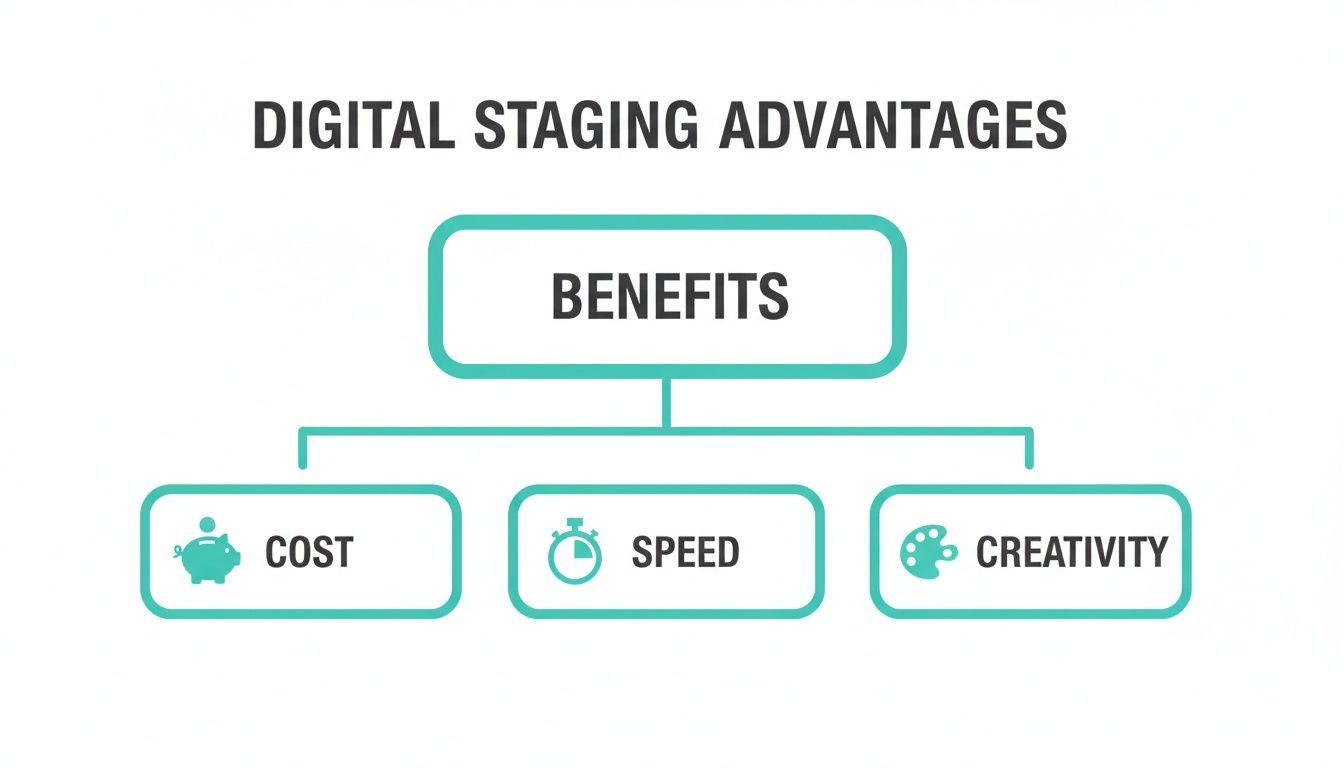
As you can see, the core benefits are efficiency and flexibility. You get to move faster, save a ton of money, and test out different looks to find what clicks with your target buyers.
The Core Features You Absolutely Need
When you're comparing different platforms, zero in on the features that have a direct impact on how real your staged photos look. Here are the essentials you shouldn't compromise on:
AI That Understands Realism: This is the big one. The software needs to be smart enough to analyze the lighting, shadows, and perspective of your room. It should place a virtual sofa in a way that looks like it's actually sitting on the floor, casting a natural shadow, not just awkwardly pasted on top of the photo.
A Deep Library of Styles: Your listings aren't one-size-fits-all, so your staging software shouldn't be either. Look for a wide variety of design styles. You’ll want everything from Japandi (that clean mix of Japanese and Scandinavian design) to Mid-Century Modern and Coastal to fit the vibe of different homes and appeal to different buyers.
High-Resolution Exports: Your photos need to look sharp on everything from a phone to a giant monitor. The software absolutely must export in high resolution (like 4K). Grainy or pixelated images scream unprofessional and will kill a listing's appeal on Zillow or Airbnb.
Item Removal and Decluttering: This feature is a lifesaver. A top-tier tool lets you upload a photo of a cluttered room, digitally erase all the junk, and start with a clean slate. This is perfect for rented spaces or homes where the owners are still living.
Advanced Capabilities That Give You an Edge
Once you have the basics covered, a few advanced features can really set your listings apart and save you even more headaches.
Some of the most powerful tools are now offering virtual renovations. Imagine showing buyers a home with a dated kitchen, but also showing them a version where you’ve digitally updated the cabinets, countertops, and flooring. You're not just selling a house; you're selling its potential. With Interior Redesigne AI, you can visualize these ideas before committing to costly real-world changes.
The virtual staging market is moving fast. Valued at over $1.2 billion in 2024, it's no longer just about placing furniture. The best platforms now use sophisticated AI to automate design and even incorporate VR for immersive walkthroughs.
Understanding these features is key, and it helps to see how they fit into the broader landscape of AI content creation tools. For those just getting started, our guide on interior design software for beginners is a great place to build a foundation.
A Step-By-Step Guide to Staging Your First Room
Ready to jump in and stage your first room? It’s a lot simpler than you might think. With the right approach, you can transform an empty space into a listing photo that grabs attention in just a few minutes. Think of it as showing potential buyers what life could look like in their new home.
Let's walk through the essential steps, from taking the right kind of photo to choosing designs that help people emotionally connect with the property.
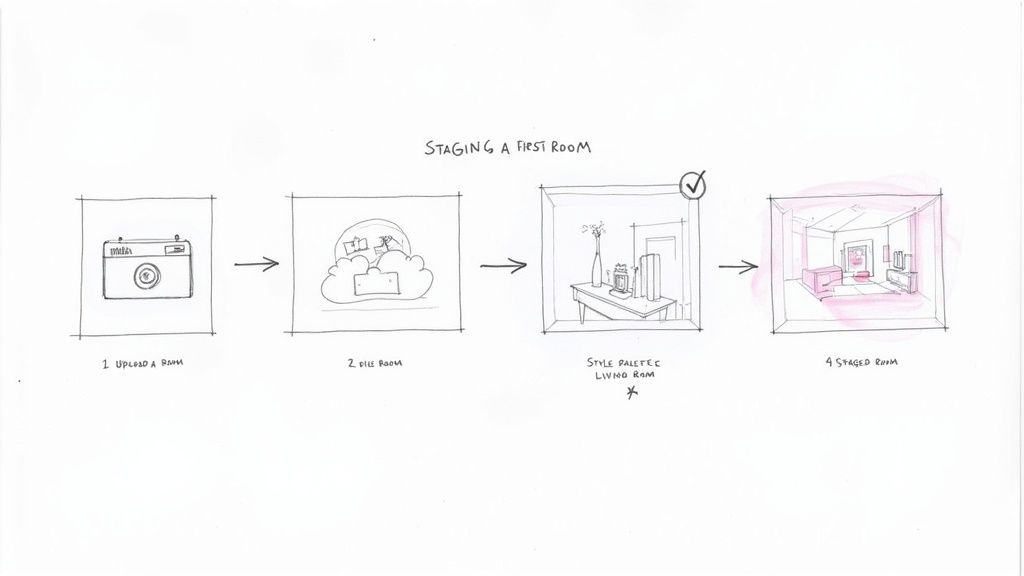
Step 1: Capture a High-Quality Photo
Here’s a hard truth: your final staged image is only ever as good as the photo you start with. A blurry, dark, or poorly angled picture will make even the most beautiful virtual furniture look fake. You don't need to hire a pro, but putting a little thought into your shots makes a huge difference.
Step 2: Upload and Choose Your Direction
Once you have a great photo, the fun begins. Upload it into a tool like Interior Redesigne AI and start setting the creative direction. Instead of staring at an empty room and wondering where to even begin, you can instantly see multiple design concepts come to life.
This is a game-changer. You can quickly test out different styles—maybe Modern Farmhouse fits the home's vibe, or perhaps Minimalist would appeal more to your target buyer. It’s a fast, flexible way to see what works without being locked into a single look.
The real magic of modern AI virtual staging is the speed. You’re not dragging and dropping individual pieces of furniture. You’re generating a fully furnished room in under 60 seconds, which lets you experiment with dozens of layouts and styles effortlessly.
Step 3: Fine-Tune for Each Room
Every room has a purpose, and your staging should reflect that. This is how you help buyers imagine themselves actually living there. Here are some practical tips:
- Living Room: Create a welcoming, social space. Arrange sofas and chairs to face each other to encourage conversation. An AI tool can help you test different layouts to see what fits best without blocking walkways, which is key for smaller family homes.
- Bedroom: This should feel like a sanctuary. Stick to a calm color palette and make the bed the focal point. Use virtual staging to show how a king-size bed fits comfortably, easing a common buyer concern.
- Kitchen: Show off both function and style. Keep countertops mostly clear to highlight the space. Add a few small items, like a bowl of fruit or a vase, to make it feel like a real home. AI can help you visualize a new backsplash or cabinet color to show renovation potential.
- Outdoor Spaces: A barren patio can be a dealbreaker. Virtually add a dining set, some potted plants, and string lights to transform it into an inviting oasis for summer evenings.
If you need more inspiration, you can explore different looks with our guide on free AI room design tools.
Best Practices for Photographing Rooms for Virtual Staging
Follow these simple tips when taking photos to ensure your virtual staging software produces the most realistic and professional results.
| Tip | Why It Matters | Example |
|---|---|---|
| Shoot in Landscape Mode | This wide format matches how listings are displayed online and makes rooms feel more expansive and natural to the eye. | Turn your phone or camera sideways before you snap the picture. |
| Use Natural Light | Sunlight provides clean, even lighting. Artificial lights can create a yellow cast and harsh shadows that are hard to work with. | Open all curtains and blinds. Shoot mid-morning or late afternoon for the best light. |
| Stand in a Corner | This angle captures the most of the room's layout (usually three walls) and creates a sense of depth, making the space feel larger. | Position yourself in one corner of the room, aiming your camera toward the opposite corner. |
| Keep the Camera Level | Shooting from eye level (around 4-5 feet) prevents distorted walls and floors, which makes placing virtual furniture much more realistic. | Hold the camera straight, parallel to the floor. Avoid tilting it up or down. |
| Tidy Up First | Clutter, stray cords, or personal items distract the AI and the viewer. A clean slate produces a much cleaner final image. | Remove all personal photos, stacks of mail, and unnecessary items from the room. |
Getting the source photo right is half the battle. A great starting image gives the software the best possible canvas to work with.
Common Mistakes That Make Staging Look Fake
Great virtual staging is practically invisible. It should blend into a room so seamlessly that a potential buyer simply sees a beautiful, welcoming home. But when it's done poorly, it sticks out like a sore thumb and can make your entire listing feel untrustworthy.
The goal isn't to create a digital fantasy; it's to paint a realistic and inviting picture of what's possible. Let's walk through the most common mistakes that scream "fake" and how you can avoid them.
Mismatched Lighting and Shadows
Nothing gives away a bad staging job faster than mismatched lighting. If you have soft sunlight pouring in from a window on the left, the shadows on the virtual sofa better be falling gently to the right. When the shadows are wrong or nonexistent, the furniture looks like it's been cut and pasted, floating awkwardly in the space.
- What Not to Do: Dropping a brightly lit piece of furniture into a photo of a dimly lit room.
- What to Do Instead: Use a good virtual staging software for real estate that can analyze the photo's existing light. The best tools use AI to understand where the light is coming from and automatically cast believable shadows.
Incorrect Furniture Scale
Have you ever seen a listing where the sofa looks like it was made for a dollhouse, or the dining table is so huge it barely fits? This is a classic rookie mistake, and it completely shatters the illusion of a real room. Getting the scale right is absolutely essential to help buyers accurately gauge a room's true size.
Incorrect scale doesn't just look fake; it misleads buyers. A miniature couch might make a small living room feel larger than it is, leading to disappointment during an in-person viewing. Be realistic.
Clashing Styles and Architecture
Shoving sleek, ultra-modern furniture into a charming, historic home with original crown molding just feels off. The design choices should honor the property's character, not fight against it. When the style is a total mismatch, it creates a jarring visual that feels completely inauthentic.
Getting these details right is more important than ever. In North America, over 70% of U.S. realtors now use virtual staging to make empty homes more attractive. With this widespread adoption, buyers have come to expect a certain level of quality. You can dive deeper into these market trends on MarketGrowthReports.com.
The Ethical Line: Disclosing and Hiding Flaws
This brings us to a critical point: ethics. Virtual staging is a tool for showcasing potential, never for hiding a property's flaws. Digitally painting over a crack in the wall, covering up water stains, or concealing damaged flooring isn't just a bad idea—it's deceptive.
Transparency is non-negotiable. Always add a tasteful watermark or note in the description that says "Virtually Staged." Your job is to fill an empty room with possibility, not to cover up problems. This kind of honesty builds the trust you need to close a deal.
Frequently Asked Questions About Virtual Staging
Jumping into something new like virtual staging always brings up a few questions. Whether you're an agent trying to sell a home faster, a homeowner on a budget, or an Airbnb host trying to fill your calendar, you need straight answers. Let's dig into the questions we hear most often.
Is Virtual Staging as Effective as Physical Staging?
For online listings, it's often even more effective. Think about it: 97% of homebuyers start their search online. That first photo is everything. A beautifully staged image is the hook that gets them to stop scrolling and actually book a showing.
While physical staging is great for in-person tours, its main job is to create an emotional connection online that gets them in the door. Virtual staging does exactly that, but for a tiny fraction of the cost and time. Plus, with tools like Interior Redesigne AI, you can try multiple styles quickly to see what resonates most with buyers.
Can I Virtually Stage a Room That Still Has Furniture?
Absolutely. This is one of the most powerful features of modern virtual staging software for real estate. The best tools have an AI feature that’s usually called something like "object removal" or "decluttering."
It's a pretty slick process:
- Upload a photo of the room as-is, clutter and all.
- The software’s AI digitally removes the old furniture, giving you a clean slate.
- From there, you can drop in new, stylish virtual pieces that really make the space shine.
This is a lifesaver for people who need to sell a home they're still living in, or for rental owners who want to refresh their listing’s look without buying all new furniture.
How Much Does Virtual Staging Typically Cost?
We're talking a world of difference compared to physical staging. Physically staging a home can easily set you back thousands of dollars. Virtual staging is way more wallet-friendly.
Full-service agencies might charge on a per-image basis, usually somewhere between $20 to $100 an image. But the real savings come from subscription-based AI software. With a tool like Interior Redesigne AI, you can stage an entire house for less than it costs to rent one sofa for a month, making it a realistic option for almost any budget.
How Should I Disclose Virtual Staging to Buyers?
Simple: be upfront and honest. It’s a standard best practice in real estate to let people know when photos have been virtually staged. It builds trust and makes sure everyone’s on the same page when they show up for a tour.
It’s easy to do. Just try:
- Adding a small, clean watermark like "Virtually Staged" in a corner of the photo.
- Putting a quick note in the property description, like, "Some images have been virtually staged to illustrate the property's potential."
This little bit of transparency ensures buyers know they're seeing a vision of what the home could be. While AI is a powerful tool, remember to combine its ideas with your own taste. For bigger projects, consulting a professional designer is always a great idea.
Ready to see how an AI interior designer can transform your space? Try Interior Redesigne AI to instantly reimagine your room from a photo or sketch.